.svg)



B2B Google Ads pays off when the account is built to turn away the wrong searchers and to learn from what your sales team closes. B2B keyword volume is small, the same queries are typed by job seekers, students, existing customers and competitors' staff, and since September 2026 Google has been upgrading many Search campaigns to wider query matching. This guide covers the structure, exclusions, bidding and Performance Max rules that keep spend on buyers.
Key takeaways
- Google scheduled Search campaigns that used campaign-level broad match or automatically created assets for automatic upgrade to AI Max from September 1, 2026. AI Max matches searches beyond your keyword list; negative keywords still apply.
- B2B junk traffic is predictable, so exclusions go in before launch: jobs, salary and login terms at account level (up to 1,000 negatives), education and free-download terms in shared lists (up to 20 lists of 5,000).
- Bid on a qualified stage imported from your CRM, never on raw form fills. Google wants at least 15 conversions in the last 30 days and two or more distinct values before Target ROAS.
- Performance Max is a later addition for B2B lead generation, worth testing once a CRM-qualified conversion is imported daily, reaches 15 a month, and brand exclusions and negatives are set.
- Since June 15, 2026, the Google Ads API no longer accepts new adopters of offline conversion imports, so Google now points new upload integrations to its Data Manager.
What makes Google Ads different for B2B?
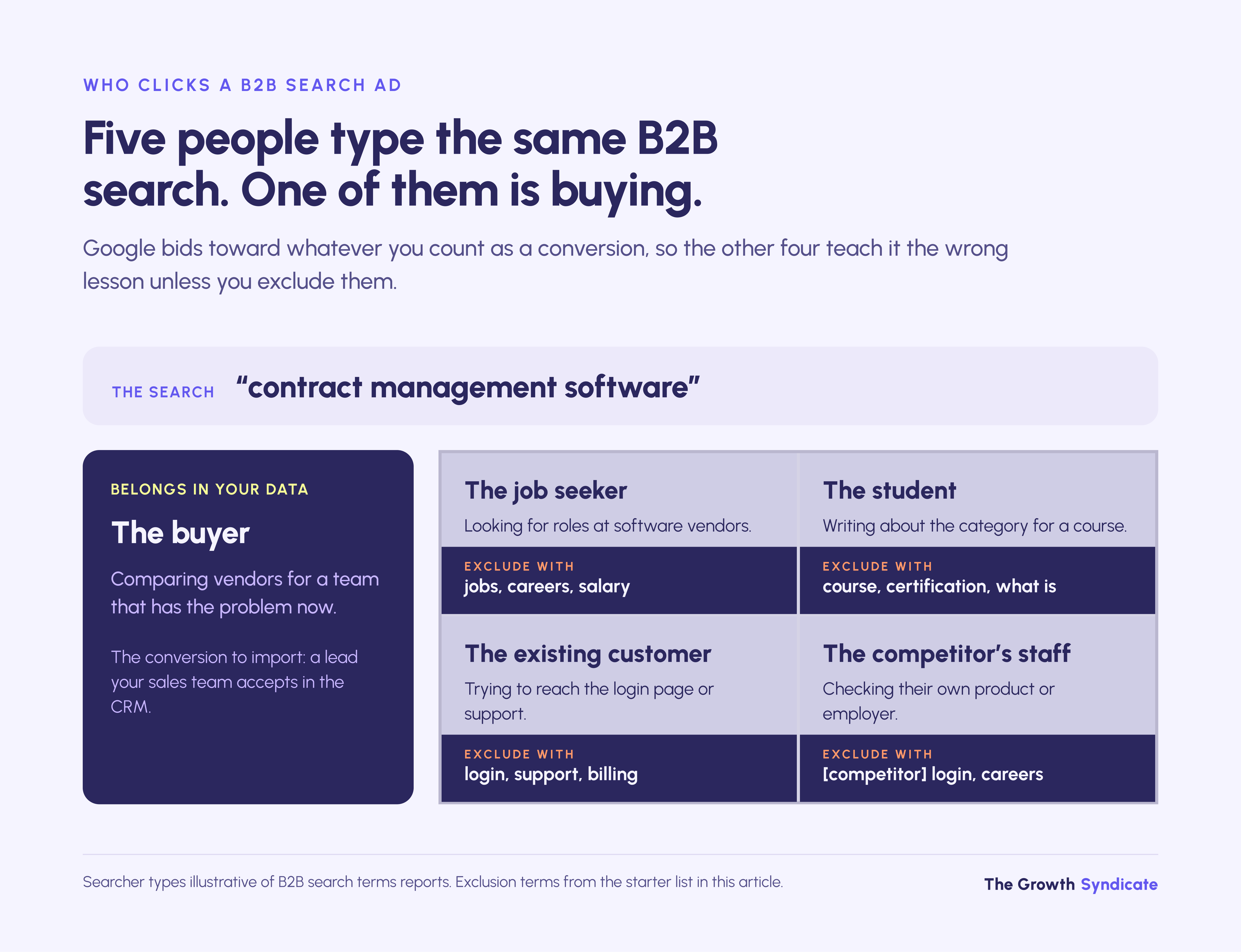
Google Ads for B2B runs on a small, shared keyword universe. A search for "contract management software" comes from buyers, and also from people applying for jobs at software vendors, students writing about the category, existing users hunting for a login page and competitors' staff. The sale then closes in a CRM weeks later, out of Google's sight.
That combination is what breaks the default playbook. Google's bidding optimizes toward whatever you tell it counts as a conversion, so if every form fill counts as the same conversion, a student downloading a template teaches the system as much as a buyer booking a demo. In ecommerce, the conversion Google sees is usually the purchase itself.
Set side by side, B2B and B2C accounts differ on six points that decide how each should be run.
Google Search can't target a job title or a company. A B2B account therefore has two levers that a B2C account leans on far less: which searches it allows, and which outcomes it reports back. The rest of this guide is about those two levers.
Do Google Ads work for B2B?
Google Ads works for B2B when buyers already search for your category or for the problem it solves. Two operating conditions then decide whether that search demand becomes pipeline: you screen out the non-buyers who type the same words, and your CRM tells Google which leads became opportunities. Without the CRM feedback, Smart Bidding drifts toward the cheapest form fills.
The three conditions, in the order they usually fail:
- Search demand exists. Someone has to type the query. Established categories such as payroll software or industrial sensors have it; a product that defines a new category often doesn't, and no bid strategy creates searches that aren't happening.
- The account can filter. The negatives, campaign split and ad copy in the sections below have to stop most non-buyer clicks before they cost money.
- Outcomes flow back. Qualified-lead and opportunity stages have to reach Google within days, or the bidding learns from form fills alone.
Deal size changes how much of the work Google Ads should carry. On lower-value, higher-volume motions it can be the main source of pipeline; on enterprise deals sold to a few hundred named accounts, it usually captures brand and competitor searches while account-based programs do the targeting.
Whether paid search belongs in your channel mix at all depends on deal value and on how fast sales follows up, which is the decision rule for B2B PPC rather than a Google Ads question.

How should you structure a B2B Google Ads account in 2026?
Split the account into separate Search campaigns for brand, competitor, high-intent category and problem-aware terms, plus remarketing, each with its own budget and negatives. Give markets with different click prices their own campaigns too. Google has been moving Search onto AI Max since September 2026, so keep brand and competitor ad groups literal by turning off search term matching there.
Separation matters because each campaign type has a different acceptable cost per qualified lead. A brand search from someone who already knows you usually converts cheaply; a category search usually costs more and converts less often. Put them under one bid target and the blended cost looks healthy because brand searches convert cheaply, which hides what the category searches actually cost.
Geography works the same way. Click prices for the same term differ between the US, the UK and continental Europe, so one campaign across all three averages one target over markets that don't share a price.
What AI Max changed in 2026
Google announced on April 15, 2026, that AI Max for Search was moving out of beta. It adds three features to a Search campaign: search term matching, which serves ads on queries beyond your keyword list; text customization, which writes ad copy from your existing ads, landing page and assets; and final URL expansion, which sends traffic to whichever page on your site it judges most relevant.
Google scheduled automatic upgrades through September 2026 for Search campaigns that used campaign-level broad match, which got search term matching, or automatically created assets, which got search term matching and text customization. Dynamic Search Ads campaigns follow from February 2027.
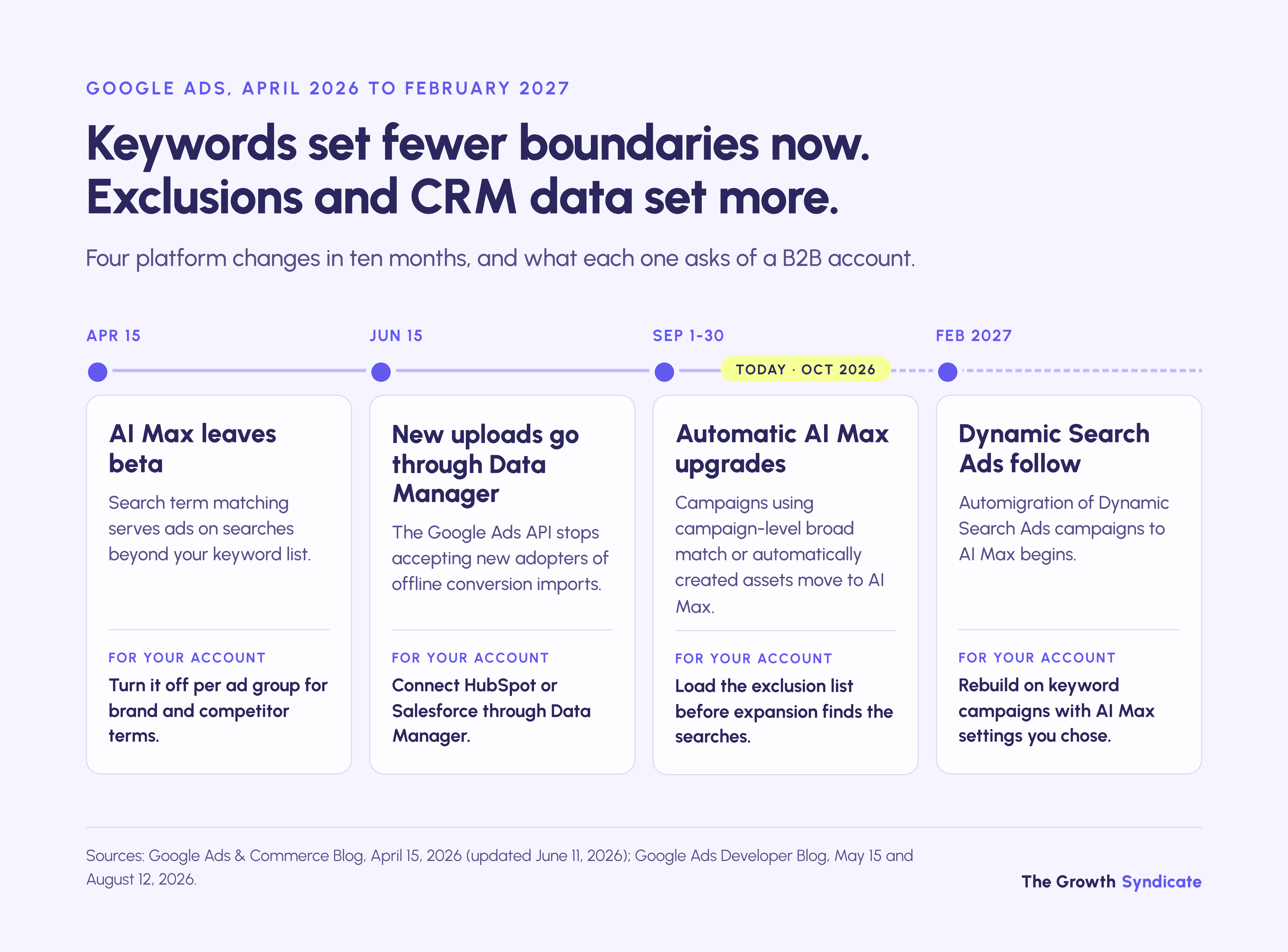
Two settings keep a B2B account in control after the upgrade. Search term matching can be switched off per ad group, which is how brand and competitor ad groups stay on the exact terms you chose. Brand inclusions can be set at campaign or ad group level, while brand exclusions apply to the whole campaign.
Negative keywords keep working with AI Max on, which is why the exclusion list in the next sections matters more in 2026 than it did when match types alone set the boundaries.
A B2B Google Ads strategy built this way also makes reporting readable. When pipeline drops, the campaign split shows whether brand demand fell, a competitor moved, or the category campaign started paying for the wrong searches.
Google Ads for B2B SaaS
High-intent SaaS searches tend to follow a handful of patterns: "[category] software", "[category] for [industry]", "[competitor] alternative", "[product] vs [product]", "[category] pricing" and integration searches such as "[your tool] Salesforce integration". Each pattern deserves its own ad group, because each needs a different landing page.
In B2B SaaS marketing, the free trial is the conversion most likely to mislead Smart Bidding. Trial sign-ups are frequent and cheap, and many never activate. Set the trial as a secondary conversion and bid on an activated trial or a product-qualified lead instead, imported from your product data or CRM.
Bidding on competitor names is allowed. Google's trademark policy doesn't restrict trademarks as keywords, though if a trademark owner complains, Google may restrict use of the trademark in your ad text. Keep competitor campaigns separate so their cost doesn't blur the category numbers.
Google Ads for B2B tech and services
IT services firms and technical consultancies see a different set of buyer queries: "[platform] implementation partner", "[problem] consultant", certification and compatibility searches, and long-tail terms that name an industry. "IT services for manufacturing" carries far more intent than "IT services".
Location matters more here than in SaaS. If you only serve some regions, set location targeting to presence, meaning people in or regularly in your target locations, rather than people who show interest in them. Otherwise some leads can arrive from countries your sales team can't serve.
How do you do keyword research for B2B Google Ads?
Start from intent, then look at volume. Sort candidate terms by how close the searcher is to buying, fund the closest tier first, and open the broader tiers only after the narrow ones produce qualified pipeline. A query with 30 searches a month and "pricing" in it is usually worth more than a definition term searched 3,000 times.
The best keyword sources in B2B are inside the company. Sales call notes and closed-won records show the words buyers actually use, and the search terms report of any existing campaign shows what people typed before they converted. Keyword Planner volumes are rounded, and accounts with little spend may see only broad ranges, so they help rank ideas against each other but are too coarse to plan a small account around.
A term can look commercial and still be dominated by the wrong intent. We've seen an agency report a client's organic ranking for "AI project management" as a win when the people searching it wanted online courses, not software. Before a term goes into a paid campaign, type it, read the results page, and ask who the top results were written for.
.avif)
What negative keyword strategy does a B2B Google Ads account need?
Build the exclusions before launch, because B2B junk traffic is predictable. Put universal terms such as jobs, careers, salary and login at account level, category terms such as free, template, course and certification in shared lists, and brand or competitor sculpting at campaign level. Then review the search terms report weekly and judge each query against CRM outcomes.
How negative keywords behave in 2026
Negative keywords don't match close variants. Excluding "jobs" doesn't block "job", so every negative needs its plural and its obvious synonyms added by hand. Google does handle capitalization and misspellings for you.
Match types work differently for negatives. A negative broad match term blocks any search containing all its words in any order; negative phrase match blocks searches containing the words in that order; negative exact match blocks only that exact search.
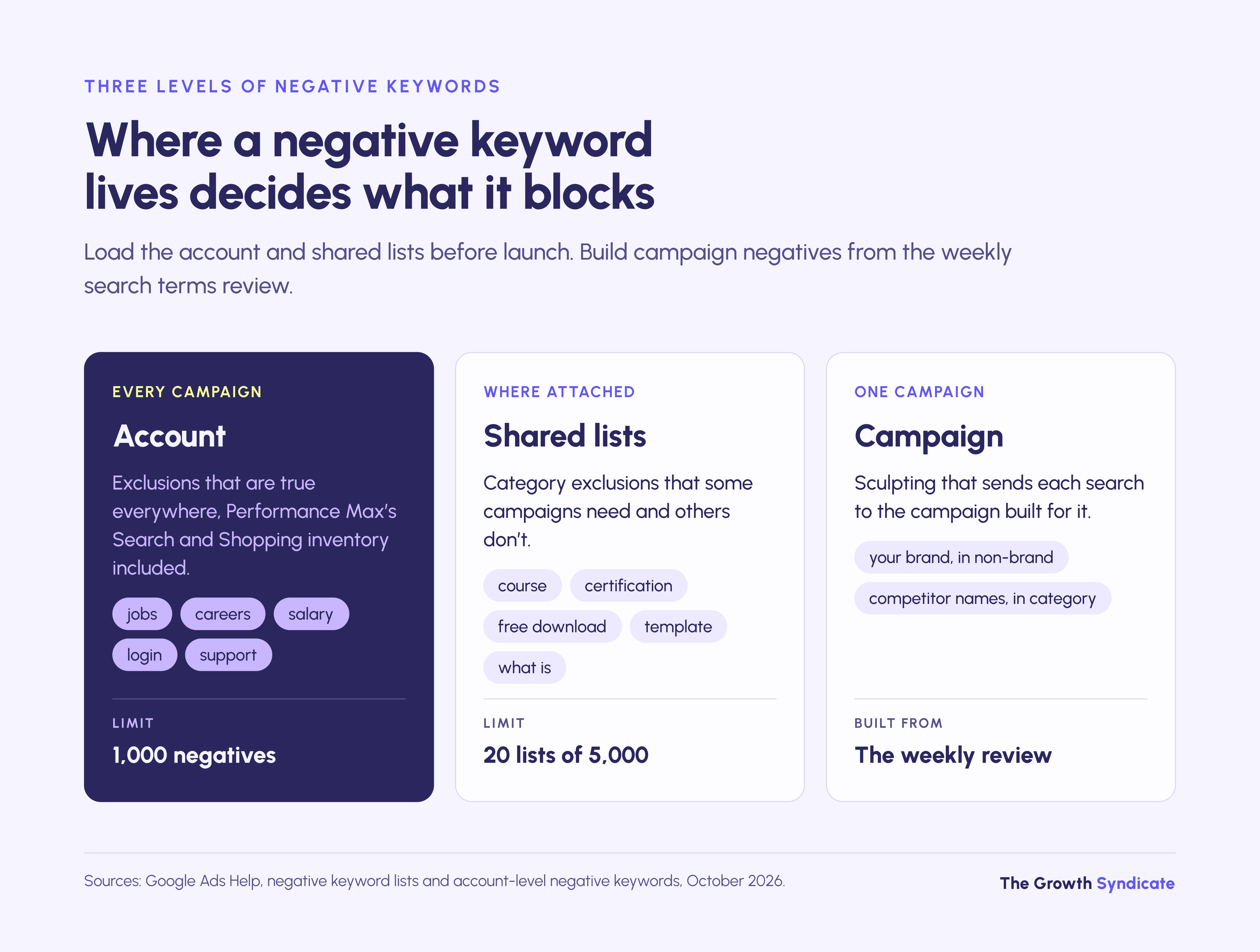
Where a negative lives decides what it covers:
- Account level holds up to 1,000 negatives and applies to eligible Search and Shopping inventory across campaign types, Performance Max included. Use it for exclusions that are true everywhere.
- Shared lists hold up to 5,000 negatives each, with up to 20 lists per account, attached to the campaigns that need them. Use them for category exclusions that some campaigns need and others don't.
- Campaign and ad group level is where sculpting happens: your brand name excluded from non-brand campaigns, competitor names excluded from category campaigns.
The starter list below assigns each category of B2B junk traffic to one of those levels.
Google's own AI Max guidance advises waiting at least two weeks after turning AI Max on before adding negatives, and warns against overusing them. That advice fits query sets nobody can predict. The categories in the table are known before the first click, so they go in on day one; the two-week wait applies to everything else.
The cost of skipping this step is large in small accounts, where every irrelevant click at B2B click prices takes a visible share of the month's budget.

The search terms review routine
Review the search terms report weekly for the first 60 days of any campaign, then every two weeks. Under AI Max, add the Source column and filter the match type column for AI Max, so you can see which searches came from the expansion rather than your keywords.
Once a month, run an n-gram pass: split every search into its single words and two-word phrases, then total cost and qualified conversions for each. A word like "salary" or "pdf" that has cost money and never produced a sales-qualified lead becomes a broad negative.
Judge searches against CRM outcomes, not form fills, because a query that fills forms with leads sales rejects is a negative too. After each round, check that no new negative blocks one of your own keywords, a common self-inflicted cut in volume. A drop in traffic after a round of exclusions is the intended result.
How do you target B2B audiences on Google Ads?
Google Search can't target by job title or company. B2B accounts get closer with Customer Match lists of target-account contacts and remarketing lists of past visitors, plus Google's in-market segments, added in observation mode so you see how each group performs without shrinking reach. When a campaign needs title-level targeting, LinkedIn remains the channel for it.
Google recommends observation for all Search campaigns, and small B2B audiences show why. Targeting would serve ads only to people on your lists, which cuts off the buyers you don't know yet; observation keeps everyone eligible and reports how list members perform.
Manual audience bid adjustments only take effect under manual bidding or Maximize clicks. Smart Bidding ignores them and instead reads remarketing list membership as one of its own signals.
The same first-party signals that make intent data in B2B worth collecting, such as pricing-page visits or repeat sessions from a target account, can become remarketing lists that change how much a search is worth to you. A generic search from someone who read your pricing page last week is worth more than the same search from a stranger, and Smart Bidding can weigh that list membership when it sets the bid.
Which bidding strategy works for B2B Google Ads?
Move up a ladder as your conversion data improves. Start on Manual CPC or Maximize clicks only while tracking is being proven, switch to Maximize conversions on a qualified-lead action, add a Target CPA once that cost is stable, and move to Target ROAS on CRM stage values once the chosen stage reaches 15 conversions in 30 days.
Bid on one stage, the deepest one with enough volume. Google's lead generation guidance says to avoid selecting goals from several stages of the lead journey for optimization. The other stages stay in the account as secondary conversions for reporting.
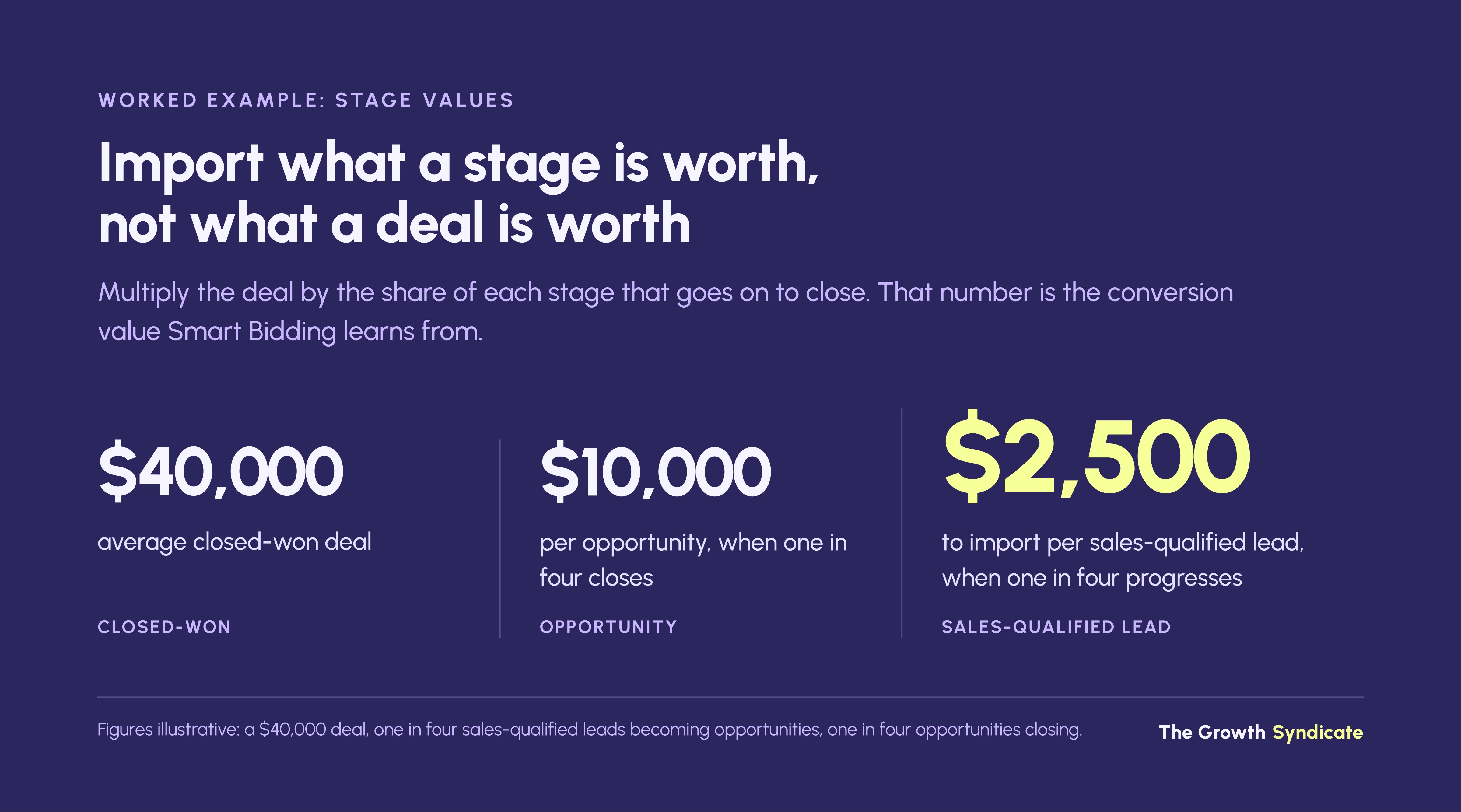
Stage values come from your own funnel. If one in four sales-qualified leads becomes an opportunity and one in four opportunities closes at $40,000, a sales-qualified lead is worth about $2,500 to you, and that is the value to import. Which stage counts as qualified is a sales decision as much as a marketing one, and a written lead qualification definition keeps the imported number stable from month to month.
Should B2B lead gen use Performance Max?
Not as the first campaign. Performance Max can work for B2B lead generation once four things are true: a CRM-qualified conversion is imported daily, that stage records at least 15 conversions a month, brand exclusions and negatives are in place, and Search campaigns already cover your core terms. Without them it tends to optimize toward cheap form fills.
The risk comes from where Performance Max spends. It serves across Search, YouTube, Display, Discover, Gmail and Maps, and its negative keywords, up to 10,000 per campaign, apply only to Search and Shopping inventory. Display and other placements can return form submissions that count as conversions and never become pipeline.
Google's own Performance Max guidance for lead generation points the same way. It recommends optimizing to the conversion goal closest to a sale with at least 15 conversions in the last 30 days, adding qualifying questions, reCAPTCHA and server-side validation to forms, and using lead-specific goals such as qualified lead, which switch on invalid-traffic protections built for lead generation.
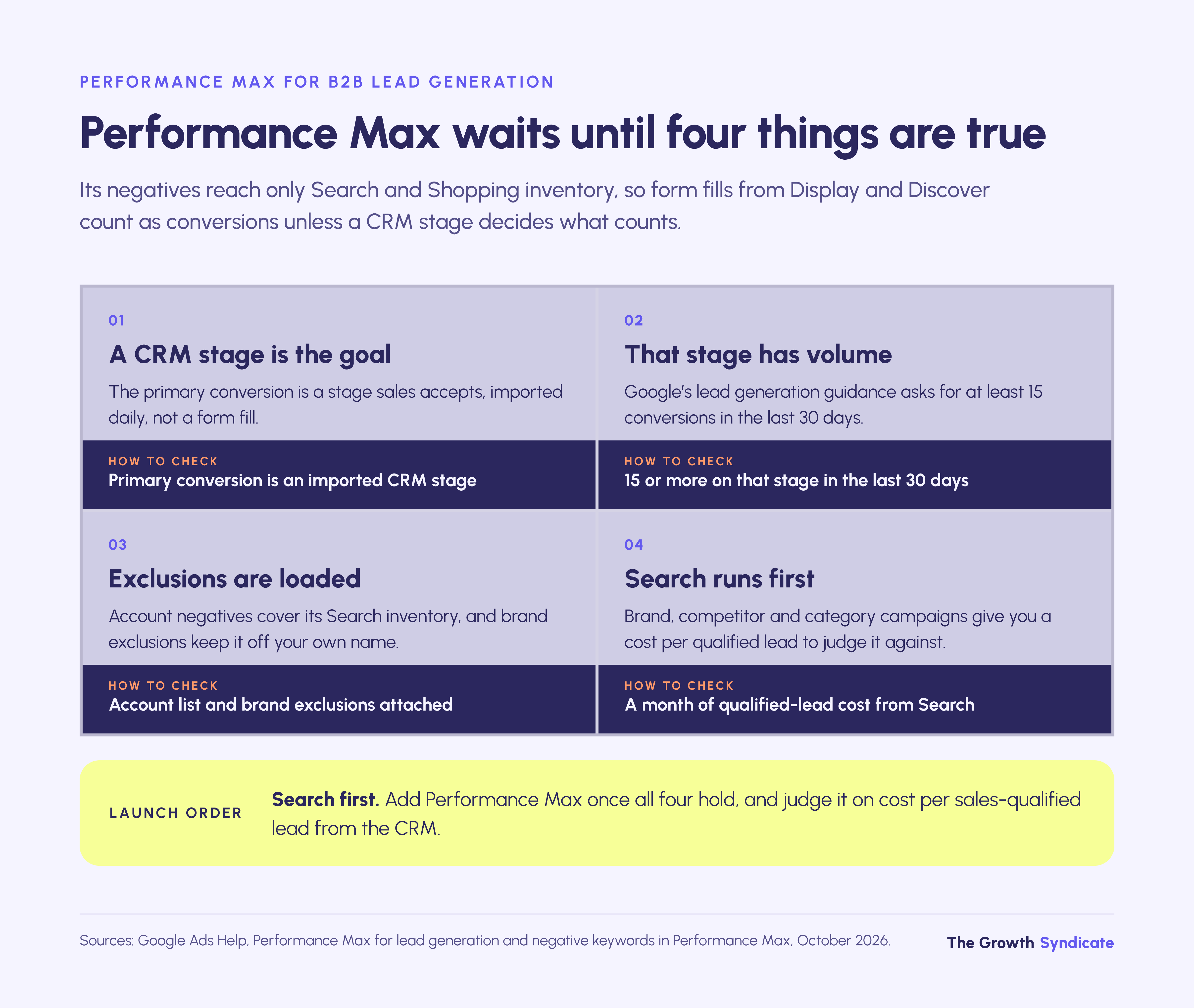
Channel reporting for Performance Max, announced in April 2025, shows where spend goes, but reporting is not control. Account-level placement exclusions reach Performance Max, yet outside a limited pilot there is no setting to switch Display off. Judge any Performance Max test on cost per sales-qualified lead or opportunity from the CRM, compared against the Search campaigns it runs beside.
How should B2B ad copy qualify clicks?
Write ads that tell the wrong person not to click. State who the product is for and give a price signal or minimum, so a student or a one-person business can see from the headline that the page isn't for them. Each click filtered out this way is budget left for a buyer, and the click-through rate drop is intended.
The examples below show the same message written to attract and written to qualify. The figures in them are placeholders for your own.
With AI Max text customization on, Google writes additional ad text from your landing page, existing ads and assets. The qualifying wording therefore has to appear on the landing page as well as in the ads you write, or the generated versions may leave it out.
What should a B2B landing page for Google Ads include?
A B2B landing page for paid search should answer the exact query that triggered the ad and ask for one action. Keep the form short, but include one or two qualifying fields such as work email or company size, so your CRM can separate buyers from students before anyone in sales spends time on them.
Most of the structural rules for B2B landing pages hold for paid traffic. Paid search adds one: the visitor arrived on a specific query and leaves when the page talks past it. The six elements a paid landing page needs:
- A headline that matches the query tier, so a pricing search lands on pricing information.
- The same qualifying signal as the ad, whether that is team size, industry or price.
- One primary action, usually a demo or quote request.
- One or two qualifying form fields, with free email domains blocked where your buyers always use work addresses.
- Spam defenses: reCAPTCHA plus server-side validation, both of which Google suggests for lead forms.
- Hidden fields that capture the Google click ID and UTM parameters and write them to the CRM record.
The sixth element is invisible to visitors and decides whether everything in the next section works.
How do you feed CRM outcomes back into Google Ads?
Capture the click ID on every form, store it on the CRM record, and send each qualifying stage back to Google as its own offline conversion. Google's current route is enhanced conversions for leads through Data Manager, which connects HubSpot and Salesforce directly. Upload daily, and bid on one stage only.
In a new account, TGS checks whether conversions fire at all and where they land after firing before any conversation about keywords or bids.
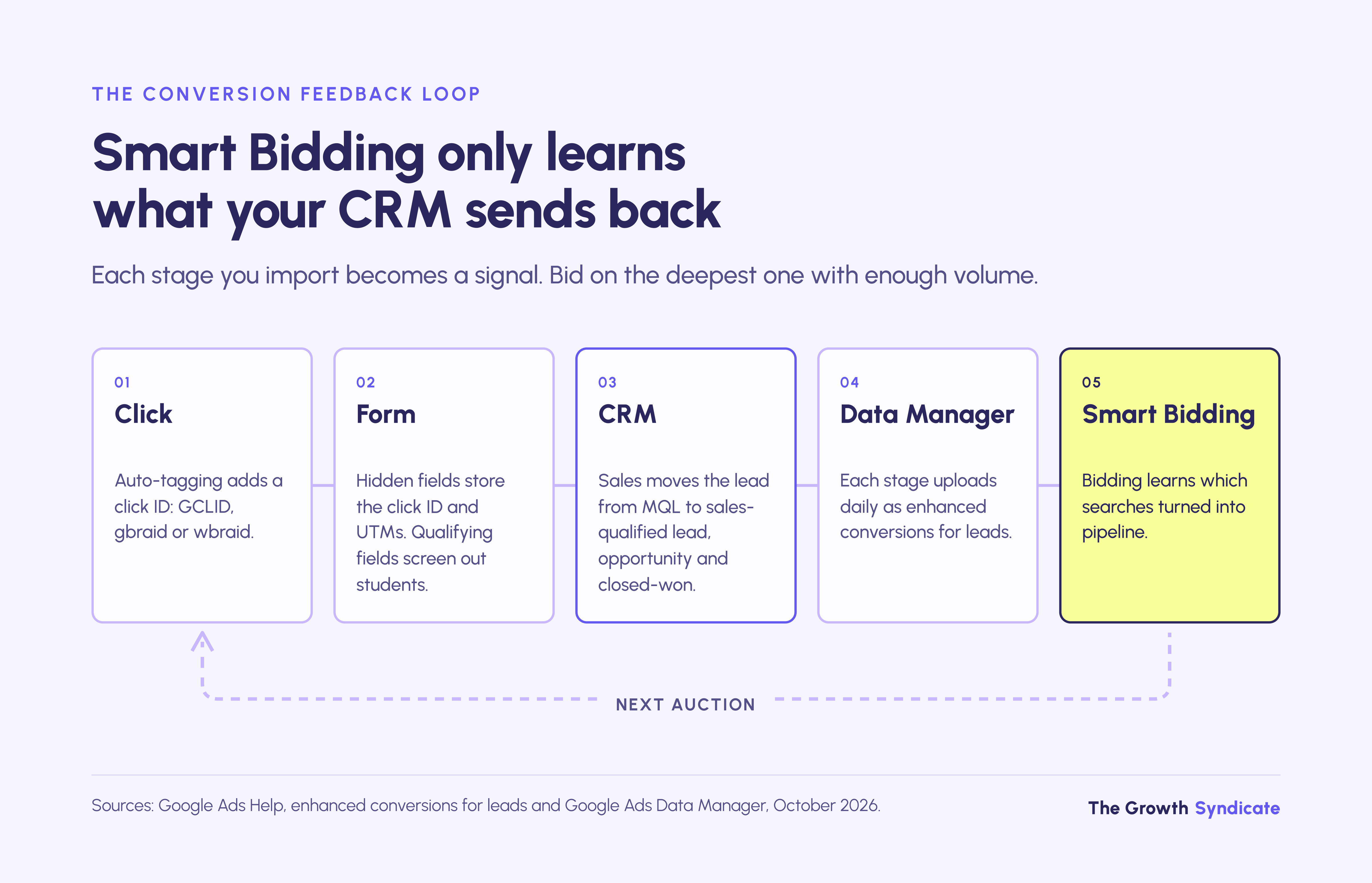
The setup takes eight steps:
- Turn on auto-tagging in Google Ads, so every click carries a click ID.
- Capture the click ID (GCLID, plus the gbraid and wbraid variants) and UTM parameters in hidden form fields, and write them to the lead or contact record.
- Turn on enhanced conversions for leads, which matches hashed email or phone numbers from your CRM to ad clicks. Collect them with consent.
- Connect the CRM through Data Manager. HubSpot and Salesforce connect directly, and the first run imports the last 14 days. Since June 15, 2026, teams starting API uploads have had to use the Data Manager API, while existing uploaders migrate.
- Create one conversion action per stage, such as MQL, sales-qualified lead, opportunity and closed-won, using lead goal categories such as qualified lead and converted lead.
- Make one stage primary for bidding and set the others as secondary.
- Assign values per stage, worked out from your own conversion rates and deal size.
- Upload daily rather than in occasional batches.
Upload windows set a limit long sales cycles run into. Google doesn't import offline conversions uploaded more than 90 days after the last click, and for enhanced conversions for leads the limit is 63 days. If your deals take six months to close, closed-won can't be the bidding stage; a sales-qualified lead or an opportunity created within weeks of the click can.
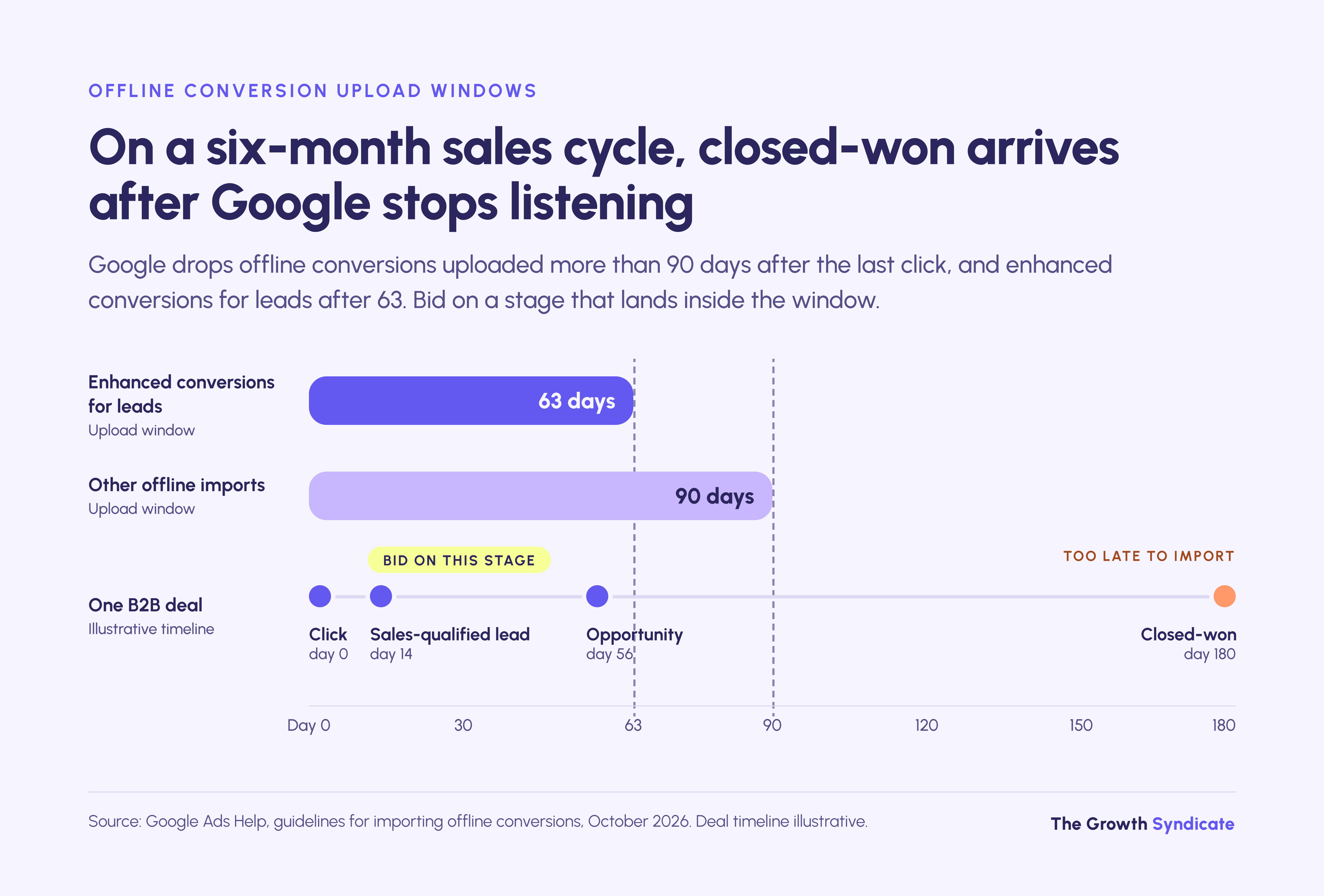
Specialists who only read platform dashboards can miss this, because the dashboard shows the conversions that arrived, not the closed deals that never could.

Imported stages tell you which searches produced pipeline. They don't settle B2B marketing attribution across channels, so read the Google Ads report as the search channel's view of the funnel, not as the full answer.
How much should you spend on B2B Google Ads?
Size the budget from the conversion volume your bidding needs, not from the search volume available. Target ROAS on a qualified stage needs about 15 of those conversions every 30 days, so the monthly floor is roughly 15 times your expected cost per qualified lead. Below that, stay on Maximize conversions or Target CPA.
At an illustrative $400 per sales-qualified lead, that floor is $6,000 a month before value-based bidding has enough to learn from. Click and lead costs vary by category and market, which is why benchmarks by channel deserve their own treatment rather than a single number here.
Which B2B Google Ads mistakes burn the most budget?
The most expensive B2B Google Ads mistake is bidding on raw form fills, because Smart Bidding then buys more of whatever fills forms. Two structural errors follow close behind in the accounts TGS audits: one campaign carrying brand, competitor and generic terms under one target, and broad or AI Max matching running without exclusions or a weekly search terms review.
The three mistakes, with the fix for each:
- Optimizing to every form fill. When newsletter sign-ups, content downloads and demo requests are all primary conversions of equal value, the system learns to buy the cheapest of them. Fix it by moving content downloads to secondary conversions and importing a qualified stage.
- One campaign for everything. Brand searches make the blended cost look healthy while category spend goes to the wrong searches unnoticed. Fix it with the five-campaign split above.
- Expansion without exclusions. Broad match and AI Max find searches you never wrote, and in B2B many of them come from people who will never buy. Fix it with the starter list and the review routine.
Where B2B Google Ads breaks down
Google Ads captures demand that already exists. It breaks down when buyers don't search for your category yet, and when your market is a short list of named enterprises that rarely produces enough conversions for Smart Bidding. Search then plays a supporting role while other channels build demand or reach specific accounts.
The limits worth planning around:
- New categories. If nobody searches for what you sell, bids can't buy the searches. Build awareness elsewhere and keep a small brand campaign to catch what that produces.
- Named-account enterprise sales. With 200 target accounts, LinkedIn's job-title targeting and account-based programs do the reaching; Google Ads catches brand and competitor searches from those accounts.
- Low conversion volume. Under about 15 qualified conversions a month, value-based bidding and Performance Max lack the volume Google recommends. Bid on an earlier stage and accept slower learning.
- Slow sales follow-up. In a 2011 Harvard Business Review study of 1.25 million leads at 42 US companies, firms that tried to contact a lead within an hour were nearly seven times as likely to qualify it as firms that tried even an hour later. Fix response time before raising spend.
- Research moving into AI assistants. In the 6sense 2025 Buyer Experience Report, 94% of nearly 4,000 B2B buyers said they used large language models during their buying process. ChatGPT Ads match ads to the context of a conversation rather than to keyword lists, report only aggregated results, and offer negative phrases only to qualifying advertisers, so the query-level exclusion approach in this guide doesn't carry over.
- Exclusions never finish. AI Max and close-variant matching keep finding new searches, so the review routine is permanent work, not a launch task.
What to do next
Start with the CRM connection and the exclusion list, because both decide whether any later bidding change can work. Structure comes next, then the bidding ladder, with Performance Max last. Where to begin depends on the state of your account today, and most B2B accounts fit one of the situations below.
- If you're launching a new account, build the five campaigns, load the starter negatives, and stay on click-based bidding until one qualified conversion is tracked from form to CRM to Google.
- If you already spend and lead quality is poor, pull 90 days of search terms, run an n-gram pass, and compare the results with CRM outcomes before touching bids.
- If your CRM isn't connected to Google Ads, fix that first, since nothing else here works without it.
- If you get fewer than 15 qualified conversions a month, bid on an earlier stage and hold off on Target ROAS and Performance Max.
- If you sell to a few hundred named accounts, keep Google Ads for brand and competitor capture and put targeting budget into account-based programs.
When an account needs an outside review, the B2B PPC team at TGS starts with the search terms report and the CRM connection before any change to bids or budget.
Frequently asked questions
How long do B2B Google Ads take to show results?
Google says a bid strategy can take a few conversion cycles, typically one to two, to calibrate after a change. Value-based bidding can take several months to ramp up if offline conversions arrive more than seven days after the click. Plan on two to three months before judging bidding on qualified leads, and one full sales cycle before judging pipeline.
Should B2B advertisers use broad match keywords?
Broad match works in B2B only with conversion data from a qualified stage, a full negative list and a weekly search terms review. Without those, it spends on loosely related searches that small B2B budgets can't absorb. Start on exact and phrase match, then test broad match in the category campaign once qualified conversions flow back.
How many negative keywords should a B2B account have?
There is no right number. A new B2B account starts with the predictable categories, such as jobs, education, free and support terms, each with plurals and synonyms, then grows the list weekly from the search terms report. Google caps account-level negatives at 1,000 and allows 20 shared lists of 5,000 each.
Can you target job titles with Google Ads?
Not on Google Search, which has no targeting by job title, seniority, company name or company size. B2B advertisers approximate it with Customer Match lists of target-account contacts and remarketing lists, added in observation mode. For campaigns that must reach a specific role, LinkedIn's job-title targeting is the better channel.
Should you bid on competitor names in Google Ads?
You can. Google's trademark policy doesn't restrict trademarks as keywords, although after an owner's complaint Google may restrict the trademark's use in ad text. Run competitor terms in their own campaign with their own budget, and exclude searches for the competitor's login, careers and support pages.
Is LinkedIn or Google Ads better for B2B?
They do different jobs. Google Ads captures people already searching for a solution, which makes it strong for demand capture and weak for reaching a named list, while LinkedIn targets by job title, seniority and company, which suits account-based programs and building awareness before buyers search. Most B2B paid programs need both.
How do ChatGPT Ads compare with Google Ads for B2B?
ChatGPT Ads match on the context of a conversation rather than keywords, and report only aggregated results, with nothing like a search terms report. They appear only on ChatGPT's Free and Go plans, so Plus, Pro, Business, Enterprise and Edu users never see them. Google Ads keeps query-level control; ChatGPT Ads are a test budget for now.
What should you ask a B2B Google Ads agency before hiring one?
Ask who reviews search terms and how often, whether they will connect your CRM stages and bid on them, and whether they report cost per qualified opportunity or only cost per lead. Confirm that you own the ad account, and ask how their fee is set, since a percentage of spend rewards spending more.
Are Dynamic Search Ads still worth running for B2B?
Dynamic Search Ads campaigns are being moved into AI Max, with the upgrade scheduled for February 2027. New B2B accounts should build on keyword-based Search campaigns with AI Max settings chosen deliberately, rather than on Dynamic Search Ads. Existing campaigns need a plan for brand controls and URL rules before the upgrade.
How often should you review the search terms report?
Weekly for the first 60 days of a campaign, then every two weeks for as long as it runs. Under AI Max, filter the match type column for AI Max to see which searches came from expansion. Add a monthly n-gram pass that totals cost and qualified conversions by word to find negatives one search at a time can't reveal.