



A HubSpot audit is a structured review of how your portal captures, classifies, moves and reports revenue data, from the tracking code to the dashboards leadership reads. The useful version runs in the order revenue flows through HubSpot and ranks every finding by what it does to pipeline reporting, because a long list of equal checkboxes can't tell you what to fix first. This guide gives a 12-step sequence with a scoring model, and ends with what no checklist can tell you.
Key takeaways
- Audit in revenue order: the process and its owner first, tracking and lifecycle definitions next, reporting near the end. A dashboard fix can't repair a source field that was never captured.
- Score each finding by condition (0 to 3) times impact weight (3 for anything that breaks pipeline reporting, 2 for routing or attribution, 1 for hygiene). Any weight-3 check that scores 0 or 1 is a red flag.
- HubSpot's built-in tools now do most of the counting: the data quality overview (from Starter, still labeled beta), the workflow Health tab, Salesforce Sync Health and the audit log.
- The findings that decide whether a cleanup lasts sit outside the settings: who owns the CRM, whether sales agrees with the stage definitions, and whether lost reasons get recorded.
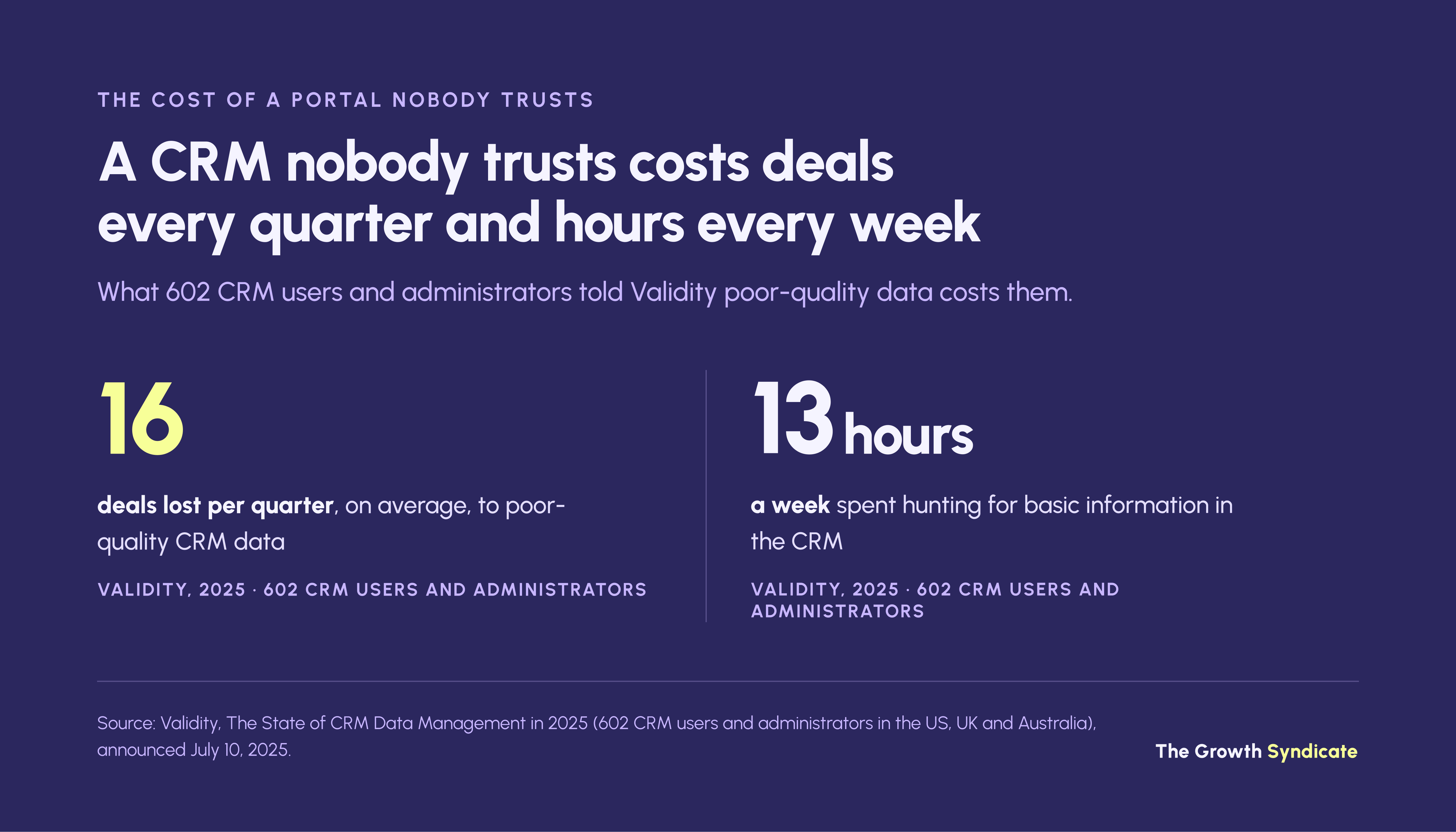
- Bad CRM data has a measurable cost. Validity's 2025 survey of 602 CRM users and administrators found companies lose an average of 16 deals a quarter to poor-quality data, and workers spend 13 hours a week hunting for basic information in the CRM.
What is a HubSpot audit?
A HubSpot audit is a review of whether your portal records the revenue process accurately enough to run the business on. It checks tracking, lifecycle definitions, record quality, properties, automation, integrations, permissions and reporting, then ranks what's broken. In practice it's a CRM audit applied to one platform, with HubSpot's own settings and tools in scope.
HubSpot partners often call the same exercise a HubSpot portal audit, and the scope is identical. CRM data cleanup is one output of the audit rather than the audit itself. Merging duplicates and fixing formats without checking the definitions behind them produces a tidier database that reports the same wrong numbers.
A marketing audit sits a level above: it asks whether strategy, channels and operations fit together, and treats the CRM as one input among many. HubSpot onboarding and implementation are separate projects again: they build a portal, while an audit examines one that's already running.
Source: The Growth Syndicate.
When does a HubSpot portal need an audit?
A HubSpot portal needs an audit once leadership starts questioning its numbers, or once the people who built it have left. It also needs one before you add a new tool, integration or AI feature on top. In each case nobody can fully explain what the portal is doing, so every decision built on it inherits the doubt.
Six symptoms come up again and again in portals that need one:
- Marketing and sales bring different pipeline numbers to the same meeting, both pulled from HubSpot.
- Nobody can say what an active workflow does, or who built it.
- Every form fill lands as a marketing qualified lead, or lifecycle stages fill up with records that never move.
- Reps keep notes and next steps outside the CRM, so deal data lags the real conversation.
- An integration creates or overwrites records, and its errors sit unread.
- A new tool or AI feature is planned on top of data the team already doubts.
The cost of living with these shows up in survey data. When Validity released its State of CRM Data Management in 2025 report, based on 602 CRM users and administrators, it said companies lose an average of 16 deals a quarter to poor-quality data. Workers spend 13 hours a week hunting for basic information in the CRM, by the same survey's count.
At the enterprise end, Gartner estimates that poor data quality costs organizations at least $12.9 million a year on average, based on research from 2020. Treat that figure as a signal of scale, not a number to drop into a mid-market business case.

"You can't build a scalable machine without a CRM that's set up correctly as your source of truth, because without it you don't know what you're doing right or wrong. Adding tools, or worse AI, on top of broken operations only amplifies the mess."
Not every messy portal needs a full audit. A team less than a year into HubSpot, with one admin and a few thousand contacts, usually gets more from fixing the two or three problems it already knows about.
Why audit HubSpot in the order revenue flows?
Revenue data enters HubSpot through tracking and forms and gets classified by lifecycle stage before workflows, pipelines and integrations carry it into reports. An error made early travels through every later stage. Auditing in that order means each fix rests on data you've already verified, instead of polishing reports built on a field nobody captured.

Most published HubSpot audit checklists are organized by hub or by object: contacts, companies, deals, then Marketing Hub and Sales Hub. That order matches the settings menu. It doesn't match the way errors spread, and a team that rebuilds deal reports before checking how original source gets populated will rebuild them twice.
The sequence below starts one step before the portal, with the revenue process itself. Some practitioners start with duplicates instead, and duplicate cleanup is a reasonable quick win to run in parallel. It shouldn't set the order, because merging records doesn't change what the records mean.
"The first thing I audit is operational, not creative. Is the website tracked, are conversions set up correctly and connected to paid channels, and where do they go once they fire? Only then the CRM, which is almost always a mess because no one owns it."
Revenue order assumes HubSpot is the system of record for deals. If Salesforce owns the pipeline and HubSpot owns marketing, the sequence still holds, but steps 8 and 12 move into a Salesforce review and step 9 becomes the hinge of the whole audit.
How do you run a HubSpot audit?
Run a HubSpot audit as 12 steps in revenue order, starting with a map of the revenue process and ending with the data sales records about its own conversations. Each step produces a short list of findings, and each finding gets a condition score and an impact weight. The interviews in step 1 usually take longer than any settings review.
Before step 1, get Super Admin access, or a user with data quality tools access and view-all permissions on contacts and companies. Export the audit log early: HubSpot keeps 30 days of activity in it, and on Starter and Professional it covers only logins and security events, according to HubSpot's audit log documentation. Note your subscription tiers too, because several native audit tools are gated by tier.
1. Map the revenue process and name the owner
Step 1 produces a one-page map of how a deal moves from first touch to closed, plus the name of the person who owns the CRM.
Interview one person each from marketing, sales and customer success about where leads come from, when they're handed over and what counts as a qualified opportunity. Write down where their answers disagree. Those disagreements are the audit's first findings, and no HubSpot setting will surface them.
Then ask who decides when a new property, pipeline or workflow gets created. If the answer is "whoever needs it," the portal has no owner, and every later step will find the consequences. The usual mistake here is skipping the step because it feels like a workshop rather than an audit.
2. Check tracking and source data
Step 2 confirms that HubSpot knows where each contact came from, which is the field pipeline-by-source reporting depends on.
Four checks cover most of it, listed below. The one that matters most is original source on new contacts, since a large share under offline sources or direct traffic usually points to a tracking gap rather than buyer behavior.
Source: The Growth Syndicate audit method.
Records that sales creates by hand, and records from events or partners, need a source value too, or they disappear from source reporting. No model of B2B marketing attribution can recover a source that was never recorded. Tracking also breaks quietly after a site migration or a new subdomain, so recheck it after every website change.
3. Review forms and lead capture
Step 3 checks that every route into HubSpot writes to the same standard properties.
List every entry point: HubSpot forms, non-HubSpot forms on the site, chat, meeting links, imports, integrations and records reps create by hand. For each, confirm that it maps to the standard fields rather than one-off duplicates such as a second "company name" property, and that hidden fields carry campaign or source where reporting needs them.
Imports are the usual back door. A trade-show list uploaded without an owner or lifecycle stage creates hundreds of records that no workflow catches, so check recent imports for both fields.
4. Test lifecycle stage and lead status definitions
Step 4 checks whether marketing and sales mean the same thing by each lifecycle stage, and whether reports use the stage that way. Mis-defined stages distort everything downstream, so this step carries more weight than any other in the data model.
HubSpot's default lifecycle stages run from subscriber through lead, marketing qualified lead, sales qualified lead, opportunity and customer to evangelist, with "other" for records that fit none of them. Lead status describes sub-stages inside the sales qualified lead stage. According to HubSpot's lifecycle stage documentation, imports, forms, workflows and the Salesforce integration can only move the default stage forward unless the value is cleared first, so a record that went backward in reality often stays forward in HubSpot.
The most expensive version of this failure is making every sign-up a marketing qualified lead. Intent never gets measured, conversion to SQL looks poor, and the argument about lead quality never ends.
Qualified stages need fit and intent together. A sales-acceptance step should record when sales confirms a lead, with a reason when it rejects one, and the number reported upward is pipeline rather than MQL count.

Setting the MQL and SQL criteria is a separate job; the audit tests whether HubSpot's configuration matches what was agreed. At Frends, a weekly review in which sales marked engaged accounts as useful or not was part of the program that moved MQL-to-SQL conversion from 14% to 25-30%.
Look for a custom "stage" property running in parallel with lifecycle stage, and for records stuck in one stage for months. HubSpot's calculated "date entered" and "cumulative time in" properties show both, though time-in-stage properties need a Professional or Enterprise subscription.
5. Measure record quality
Step 5 puts a number on how much of the database is usable: duplicates, missing critical fields, formatting errors and stale records.
HubSpot's data quality tools count most of this for you. The overview lists suspected duplicate contacts and companies, formatting issues and property problems, and it's available from Starter on Marketing, Sales, Service, Data and Content Hub, though HubSpot still labels it beta.
Counts don't tell you whether a record is right. Pull a random sample of 100 to 200 open contacts and companies and check each one by hand against the five tests below. Record the failure rate for each check, because it becomes the baseline for the next audit.
Sample 100 to 200 open contacts and companies. Source: The Growth Syndicate audit method.
Data goes stale without anyone touching it. ZeroBounce's Email List Decay Report for 2026, based on more than 11 billion addresses it verified in 2025, found that at least 23% of an email list decays within a year.
Before merging duplicates in bulk, decide which record wins, for example the one with the most recent activity or the one owned by an active user. Duplicate companies and deals matter more than duplicate contacts, because they split pipeline and revenue across two records.
6. Prune properties
Step 6 removes properties nobody uses and documents the ones that matter, so the next person who builds a report picks the right field.
Property insights in the data quality tools flags properties that are duplicated, empty or unused, and HubSpot refreshes that list daily. Beyond the flags, look for properties with no description, and for free-text fields where a dropdown belongs: industry, country and closed-lost reason are the usual offenders, because free text can't be reported on.
Before archiving anything, check whether a workflow, segment, report or integration still reads the property. Then agree on a naming convention and required fields for the properties that drive reporting.
7. Map workflows, sequences and segments
Step 7 produces an inventory of active automation, starting with the workflows that touch the most records.
The Health tab under Workflows counts workflows marked as needing review and workflows with no enrollments for at least 90 days, according to HubSpot's workflow health documentation. It needs a Professional or Enterprise subscription. It won't tell you which workflows contradict each other.
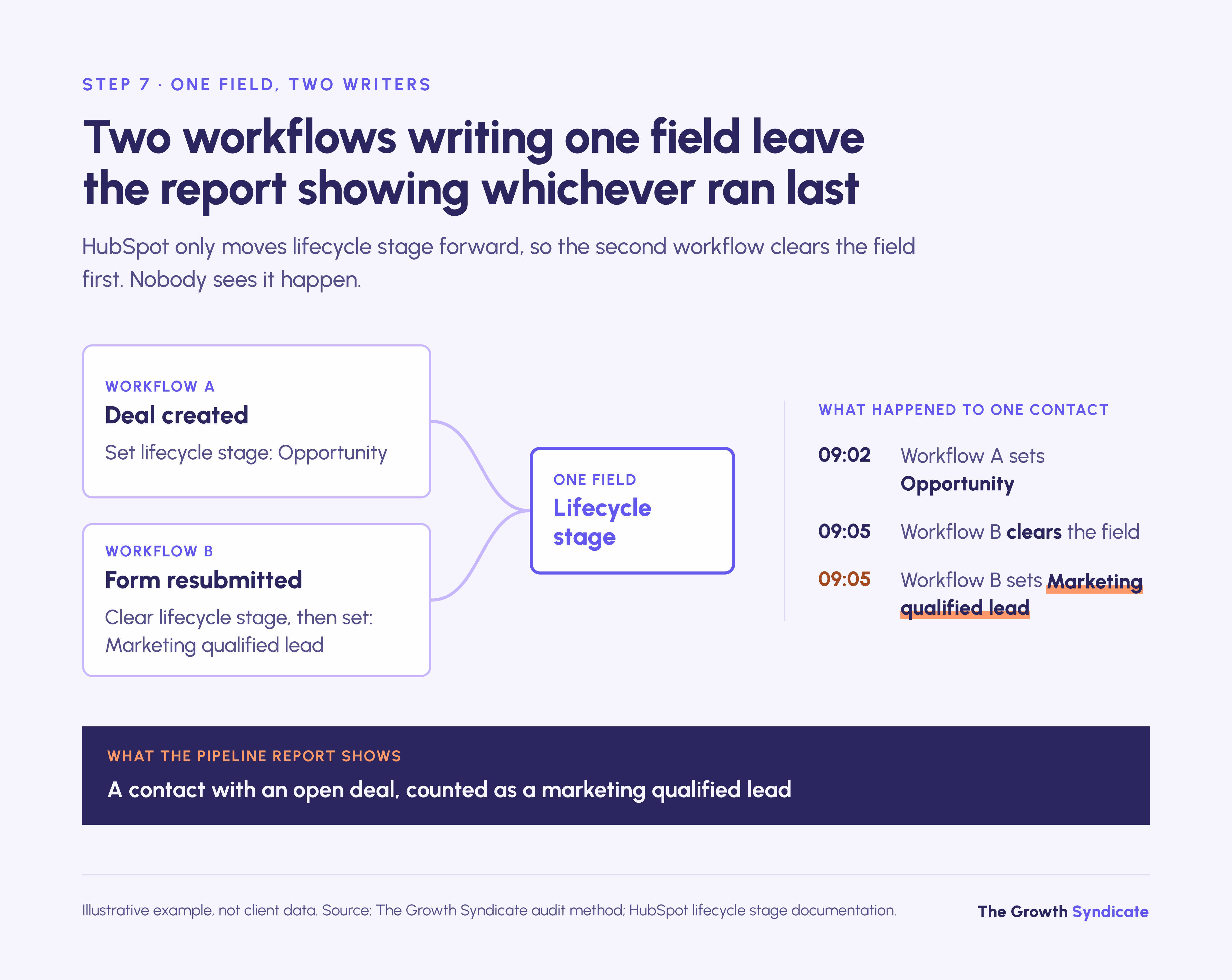
Sort active workflows by enrollment and start at the top. For each one, note the trigger, the properties it sets and its owner; any two workflows that write to the same property, lifecycle stage above all, are a conflict waiting to show up in reporting. Do the same for the segments that feed active workflows and emails, and for sequences that reps no longer use.
A workflow can still be changing records today even if everyone has forgotten it. Turning one off is safer than deleting it, unless account cleanup is switched on, because cleanup deletes turned-off workflows. On Enterprise, the audit log shows workflow edits from the last 30 days.
8. Check deal pipelines and stage definitions
Step 8 tests whether deal stages describe real buyer progress, with exit criteria, so the forecast means something.
Every stage needs a written exit criterion that describes a buyer commitment, such as "budget holder attended a demo," rather than an internal task such as "contract sent to legal." Then pull every open deal past its close date, and every open deal missing an amount, owner, close date or company association. Those four fields decide whether pipeline reporting works at all. The table below shows the difference on an illustrative four-stage pipeline.
Illustrative four-stage pipeline. Source: The Growth Syndicate audit method.
Check that stage probabilities reflect your own win history rather than HubSpot's defaults, and archive pipelines nobody uses. Deals owned by deactivated users get picked up again in step 10.
9. Inspect integrations and sync health
Step 9 lists every connected app that creates or edits records and checks whether anyone reads its errors.
For the Salesforce integration, HubSpot's Sync Health tab sits under the Salesforce connected app's data sync settings. It shows API calls used in the last 24 hours and an error card for each type: associations, custom code, duplicates, permissions, picklists, property mappings, property values and other, according to HubSpot's Salesforce sync documentation. Errors can be resynced in bulk, 100 at a time.
For every other connected app, record which objects it creates or updates, which fields it maps and who owns it. An integration keeps running while its errors pile up, which is why they go unnoticed, so give each one a named owner and a weekly check.
10. Review users, teams and permissions
Step 10 confirms that the right people can change the portal and that no records are stranded with people who've left.
Count inactive users and paid seats, keep the number of Super Admins small, and check that permission sets match roles. Decide who can create properties and workflows; in most portals that should be the owner named in step 1 and very few others. Reassign open deals and active contacts owned by deactivated users, since those records drop out of every owner-based report.
11. Reconcile reporting and dashboards
Step 11 checks that the numbers leadership sees reconcile with the deal and contact data underneath them.
Pick the three numbers leadership asks about most, usually pipeline created, pipeline by source and win rate. Rebuild each one from raw records and compare the result with the dashboard. A small gap is usually a definition question; a large one means a filter, a date property or a duplicate is distorting the report.

"You have companies that stay within their vanity metrics. They look at Google Search Console and Google Analytics, but they don't look at what actually happens after that, or ask, 'I don't have access to your CRM. Can you tell me what's working and what's not?'"
Then agree on one written definition each for pipeline, qualified lead and win rate, and archive duplicate or unused reports so nobody pulls the wrong one into a board deck.
12. Audit sales execution data
Step 12 checks whether HubSpot records what happens inside the sales conversation, above all why deals are lost. Most published checklists stop before this step, and it's often where the answer sits.
In one TGS enterprise engagement, leadership read a pipeline slowdown as a marketing problem. Marketing had in fact produced the most pipeline the company had ever generated, and the losses sat in sales execution: calls weren't recorded and lost deals carried no structured reason. No portal setting would have flagged it.
Source: The Growth Syndicate audit method.
Without structured lost reasons, a pipeline review can't separate a lead-quality problem from a sales-process problem, and marketing usually gets the blame by default.
How do you score a HubSpot audit?
Score each check twice: its condition from 0 (broken or unknown) to 3 (healthy and owned), and its impact weight from 1 to 3. Multiply the two, add up the results, and list every weight-3 check that scored 0 or 1 separately. That red-flag list, not the total, decides what gets fixed first.
Impact weights follow position in the revenue flow. Weight 3 goes to checks that break pipeline visibility or revenue reporting. Weight 2 covers anything that distorts attribution, routing or segmentation, and weight 1 covers efficiency and hygiene.
Source: The Growth Syndicate scoring model.
"Unknown" scores 0 on purpose. Not knowing whether a workflow overwrites lifecycle stage is a finding in its own right, and it's easy to skip when the person scoring built the portal.
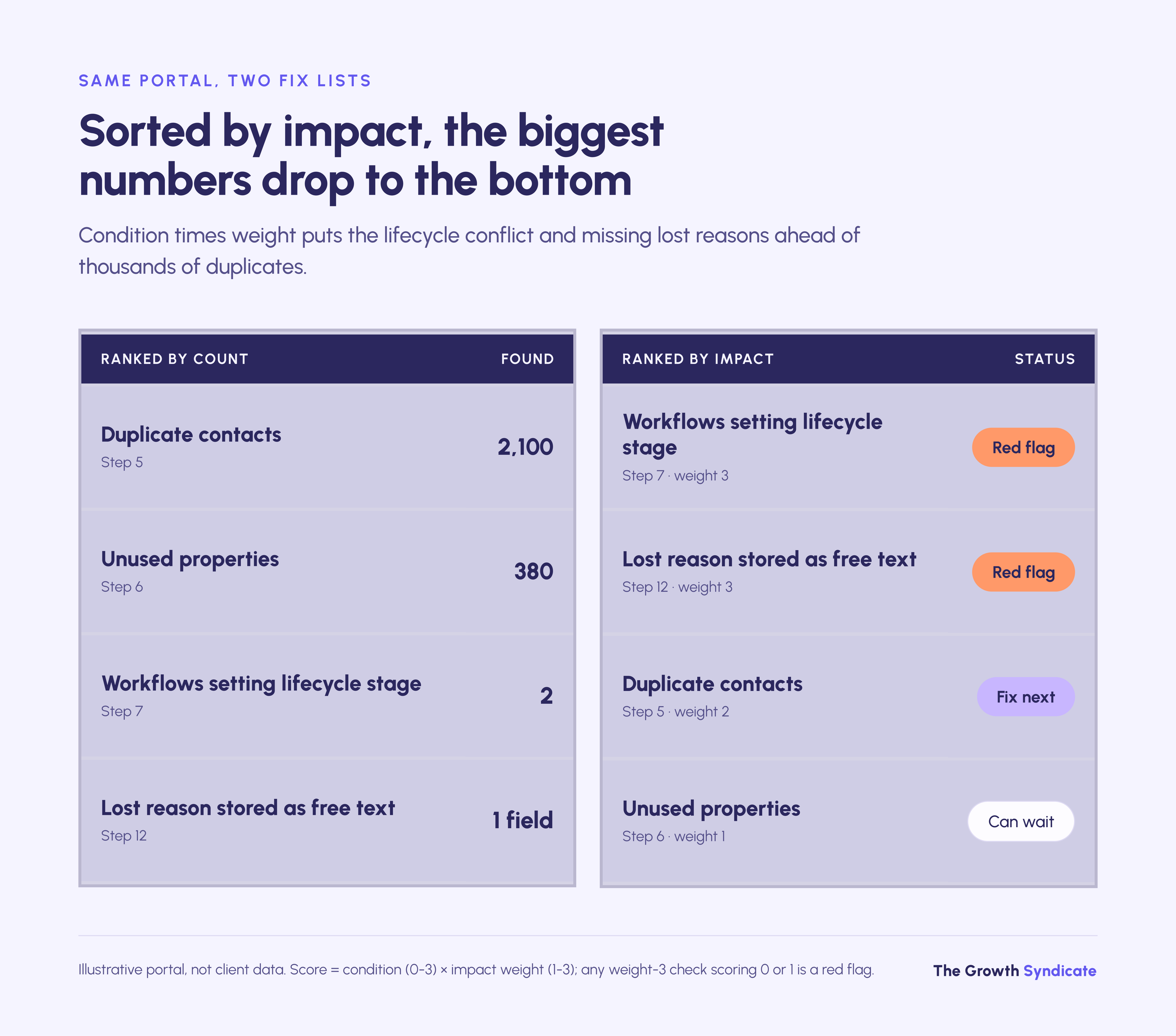
Score = condition (0-3) × weight (1-3). A weight-3 check scoring 0 or 1 is a red flag. Source: The Growth Syndicate scoring model.
To see why the weights matter, take an illustrative portal with 380 unused properties, 2,100 duplicate contacts, two workflows that both set lifecycle stage, and closed-lost reasons typed as free text. Sorted by count, the properties top the list. Sorted by impact, the workflow conflict and the lost reasons come first, because both are weight-3 checks scoring 0 or 1, while the property cleanup can wait.
A team can run this scoring on its own portal. Its limit is that the person scoring is usually the person who built the setup.
Which HubSpot tools help with an audit?
HubSpot now does much of an audit's counting itself. Its data quality tools find duplicates, formatting issues and unused properties, the workflow Health tab flags automation nobody uses, and Salesforce Sync Health lists integration errors. Most of these tools are gated by subscription tier, and some are still in beta.
Source: HubSpot knowledge base, checked October 2026. The data quality tools are labeled beta.
HubSpot's Fall 2025 Spotlight replaced Operations Hub with Data Hub, so older guides that send you to Operations Hub for these features predate the change. Account cleanup deserves particular care: once automation is on, it runs on the first of each month, deletes turned-off workflows and CRM records not modified since the cutoff you choose, and gives you 90 days to restore them (14 days for reports).
What can't a HubSpot audit checklist tell you?
A checklist can count what's in the portal. It can't tell you whether the stage definitions match how your buyers buy, or whether anyone has the authority to enforce them. Those findings come from interviews and from comparing the portal with companies that run the same motion well, and they usually decide whether a cleanup lasts.
Free automated graders, some of them run by HubSpot partners, now scan a portal in minutes and return a health score with issues ranked by impact. They're useful for the counting in steps 5 to 10, and an audit should start from that kind of baseline rather than re-counting by hand.

No scanner can see the following:
- Whether a stage definition matches what sales means by it.
- Whether the CRM owner can say no to a new property or workflow.
- Why a deal was lost, if the reason was never recorded.
- Whether the numbers leadership quotes are the ones HubSpot produces.
- How the portal compares with companies that run the same motion well.

The most useful output of an audit is often confirmation of what the team already suspected, backed by data and a ranked plan. That's why the scoring above treats "unknown" as 0, and why a self-assessment is a starting point for a conversation rather than a verdict.
How do you keep HubSpot clean after the audit?
Keep HubSpot clean by giving the CRM a named owner with the authority to approve or refuse changes, then checking errors and duplicates weekly and definitions every quarter. Without an owner, a cleaned portal drifts back toward the state the audit found, because nobody decides what gets added to it.
CRM data hygiene is the ongoing half of the job. The audit sets the standard, and hygiene keeps records at that standard between audits.
Few companies have that owner in place. In Validity's 2025 survey, only 18% of organizations without a full-time employee responsible for CRM data quality planned to hire one in the next 12 months. The same survey found that 37% of staff regularly fabricate data to tell leaders what they want to hear, which no validation rule will catch.

Where the owner sits depends on how the team is built. In companies with a revenue operations function, the CRM belongs to RevOps. In companies without one, marketing operations is the usual home, and the role needs a mandate written into team structure and processes rather than a favor someone does on Fridays.
Source: The Growth Syndicate audit method.
Prevention beats repeated cleanup. Make the reporting fields required at the stages where they matter, replace free text with dropdowns, and give imports a template with owner, source and lifecycle stage filled in.
Change control matters as much. New properties, pipelines and workflows go through the owner, every property gets a description, and a one-page log records what changed and why. Duplicate alerts and formatting automation, both on Data Hub Professional and Enterprise, can take over part of the weekly check.
Where a HubSpot audit breaks down
A HubSpot audit fixes how the revenue process is recorded. It doesn't fix a revenue process that's wrong, and on a small, young portal it can cost more than it returns. The scoring weights are judgment rather than measurement, so two auditors can rank the same portal differently.
- Small portals. With one admin, a few thousand contacts and less than a year of history, fix the known problems and set up the weekly checks instead.
- Strategy problems. If the ideal customer profile or the offer is wrong, a clean CRM reports the wrong pipeline accurately. That's a question for a wider marketing audit.
- Weights depend on the motion. A high-volume, trial-led motion should weight form capture and lifecycle automation higher than deal-stage hygiene.
- Salesforce as the system of record. A HubSpot audit then covers half the picture, so pair it with a CRM audit of Salesforce and a joint review of the sync.
- Tier gaps and beta tools. Starter portals get duplicate and formatting tools but not alerts, automation or the workflow Health tab, and beta features change, so recheck the tool table before relying on it.
- Audits that end in a report. Without an owner and a fix plan, the same findings come back at the next audit.
What to do next
Decide by where the doubt sits. If it's about the numbers, start with steps 1, 4 and 11; if it's about an inherited portal nobody understands, start with steps 1 and 7. Bring in outside help when the findings point at definitions or ownership rather than settings, since those need authority more than admin time.

If you inherited a portal from a team that left, start with the process map and the workflow inventory, so you know what the portal is doing before you change anything.
If marketing and sales report different pipeline numbers, run steps 4 and 11 together and leave the dashboards alone until the stage definitions are agreed.
If you're about to add AI or a new tool, score the steps that tool will read from first. AI that writes to lifecycle stages or deal properties will repeat whatever errors it finds there.
If HubSpot syncs with Salesforce, decide which system owns each object before the audit starts, and make the sync check weekly.
If the audit points at sales execution, take the step 12 findings to sales leadership with the lost-deal data, not a list of CRM settings.
If you want an outside view, look for a partner who asks for CRM access and pipeline data in the first call. TGS's RevOps and CRM team works on existing HubSpot setups rather than rebuilding them.
Frequently asked questions
How often should you audit HubSpot?
Run a full HubSpot audit once a year and after any event that changes the data model, such as a CRM migration, a new Salesforce sync, a sales reorganization or a website rebuild. Between full audits, check sync errors and duplicates weekly and review lifecycle and deal-stage definitions with sales every quarter.
How long does a HubSpot audit take?
A quarterly review of known checks can fit into a few hours if the portal has an owner and documentation. A first audit of an inherited portal takes longer, often a few weeks of elapsed time, because the process map and the sales interviews depend on other people's calendars rather than on HubSpot.
What should you fix first in a messy HubSpot portal?
Fix the red flags first: any weight-3 check that scores 0 or 1. Typical examples are workflows that fight over lifecycle stage, qualification stages with no agreed definition, and open deals with no amount, owner or close date. Duplicate cleanup is a sensible quick win alongside them, but it rarely changes what the reports say.
How do you find duplicate records in HubSpot?
Use the Manage Duplicates tab in HubSpot's data quality tools, available from Starter, which lists suspected duplicate contacts and companies for you to merge or reject. Set a rule for which record wins before merging. The tool doesn't cover deals, so find duplicate deals with a report grouped by company and close date.
How do you find unused properties and workflows in HubSpot?
Property insights in the data quality tools flags properties that are unused, empty or duplicated, and the list updates daily. For automation, the Health tab under Workflows counts workflows with no enrollments for at least 90 days. Check whether a segment, report or integration still reads a property before archiving it.
What is the difference between lifecycle stage and lead status in HubSpot?
Lifecycle stage records where a contact or company sits in the overall buying process, from subscriber to customer. Lead status describes sub-stages inside the sales qualified lead stage, such as attempted to contact, connected or bad timing. Audit both together, because reports usually break where the two are used inconsistently.
Which HubSpot subscriptions include data quality tools?
The data quality overview is available on Marketing, Sales, Service, Data and Content Hub at Starter, Professional and Enterprise, and on Smart CRM and Revenue Hub at Professional and Enterprise. Duplicate alerts and formatting automation need Data Hub Professional or Enterprise. HubSpot still labels the tool beta, so check its current documentation before planning around it.
Does HubSpot have an audit log?
Yes: audit logs sit under account management in HubSpot's settings and show 30 days of activity. Starter and Professional accounts can filter only login and security activity, while Enterprise adds categories such as workflows and content. Super Admins can also export a year of security activity history.
Can AI clean up a HubSpot portal?
AI can speed up the counting, for example by flagging likely duplicates or summarizing what a workflow does. It can't decide what a lifecycle stage should mean or who owns the CRM. Adding AI to a portal with wrong definitions spreads the errors faster, so run the audit before the AI rollout.
Who should own HubSpot after an audit?
One named person or team who can approve or refuse changes to properties, pipelines and workflows, and who reports on data quality. In companies without RevOps, that's usually marketing operations. Ownership by committee tends to mean no ownership, which is how many portals reach the state an audit finds.